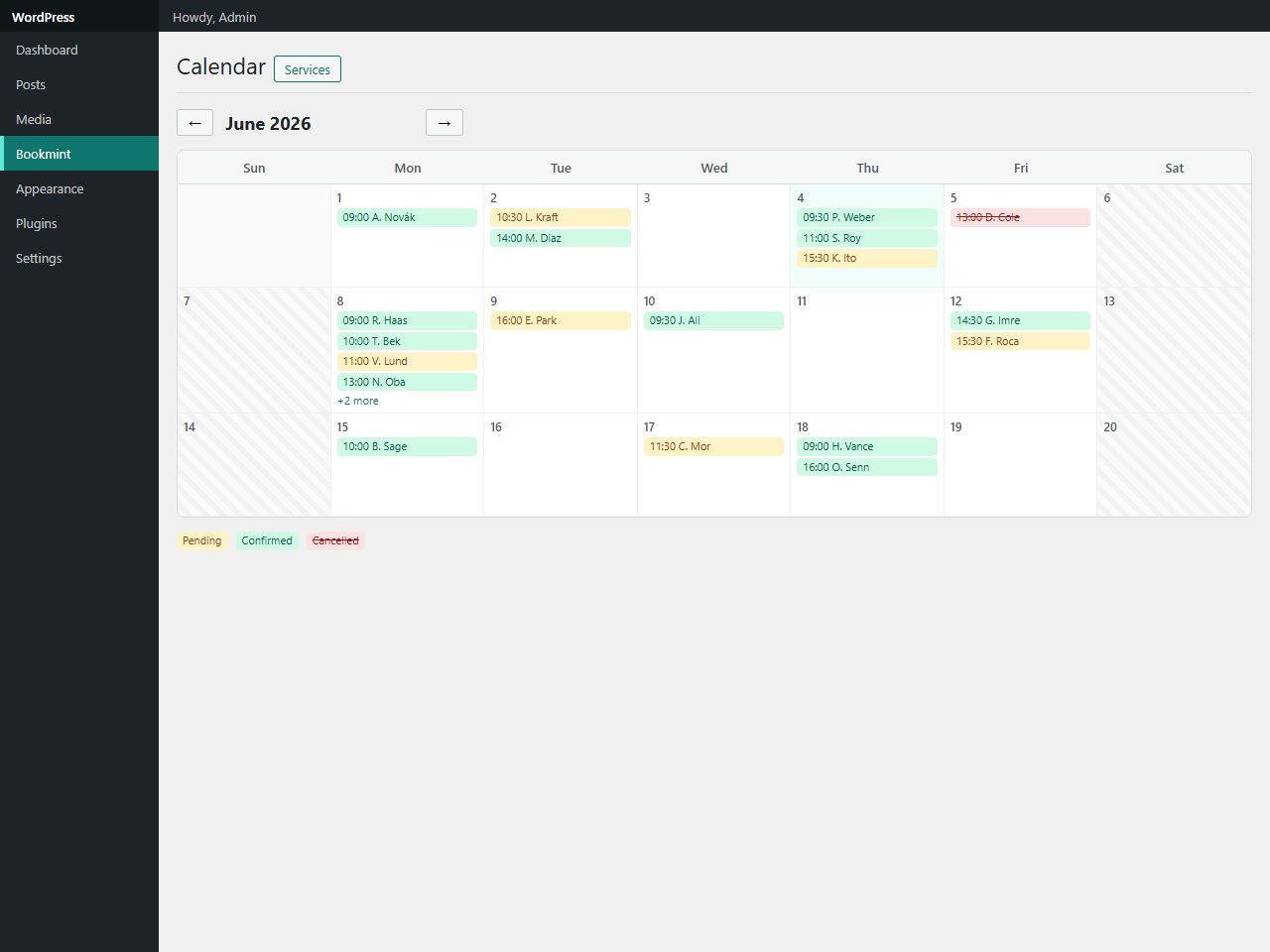
Preview and demo
Status: unchecked. Availability checks are not a security guarantee.
Description
Bookmint turns any page into a booking form. Visitors pick a service, choose an open day and time from a live availability grid, and confirm in a four-step wizard — while you manage everything from a calendar-first dashboard where bookings appear as colour-coded chips.
The slot engine respects each service's duration and after-buffer, your weekly opening hours, day-off dates, a minimum-notice rule, a booking window and a configurable interval — then re-checks availability at the moment of booking, so two visitors can never grab the same slot. Bookings move through Pending → Confirmed → Completed (or Cancelled), with optional auto-confirm, and both you and the customer get an email. Built to WordPress standards — capability checks, nonces, sanitised input, escaped output, prepared queries — translation-ready, no build step, no external services.
Highlights
- Calendar-first admin with status-coloured booking chips.
- Unlimited services with duration, buffer, price & description.
- Weekly hours, day-off dates & a live slot grid.
- No double-bookings — overlap detection with a final re-check.
- Embed via
[bookmint]or[bookmint service="ID"].
Features
Requirements
- WordPress 6.2+
- PHP 8.0+
- No build step required
Changelog
Frequently Asked Questions
What are the requirements to run Bookmint?
Bookmint is a WordPress plugin, so you need a self-hosted WordPress installation. It has no external service dependencies, requires no build step, and works out of the box once activated — making it compatible with virtually any standard WordPress hosting environment.
How do I add the booking form to my site, and can I embed it for a single service?
You can place the full four-step booking wizard anywhere on your site using the [bookmint] shortcode. If you want to pre-select a specific service, use [bookmint service="ID"] to embed a single-service booking form directly on a dedicated page.
Can two customers accidentally book the same time slot?
No — Bookmint performs a final overlap re-check at the exact moment a booking is submitted, so even if two visitors reach the last step simultaneously, only one will secure the slot. The slot grid also factors in each service's duration and after-buffer to prevent back-to-back conflicts.
How flexible is the availability and scheduling configuration?
You can define weekly working hours, block out specific day-off dates, and set a minimum-notice period, a booking window (how far ahead customers can book), and a configurable slot interval — all per your business needs. Each service can have its own duration, buffer time, price, and description, with no cap on the number of services you can create.
Will customers and I receive notifications when a booking is made?
Yes — Bookmint sends an email notification to the business and a confirmation email to the customer for every booking. You can also enable auto-confirm so bookings move straight to Confirmed, or manage them manually through the Pending → Confirmed → Completed (or Cancelled) workflow.
Is Bookmint translation-ready and safe to use on a production site?
Yes — Bookmint is fully translation-ready and built to WordPress coding standards, including capability checks, nonces, sanitised input, escaped output, and prepared database queries. It also exposes developer hooks for custom integrations, making it suitable for both end-users and developers working on client sites.
Automated Security Scan Passed
- Product version:
- 1.0.0
- Archive verified:
- Yes
- Scan date:
- 27 July 2026
- Malware scan:
- Passed
- Secret detection:
- Passed
- Dependency scan:
- Not applicable
- Static analysis:
- Passed with 6 non-blocking findings
A passed automated scan does not guarantee that the software is free from every vulnerability or security risk. The result applies only to this version. View scan methodology
Technical requirements
- See the detailed requirements in the product description below.
What is included
- Plugin package with full downloadable files
- Product listing and product page guidance
- Product files ready for self-hosting or integration
- 10 listed features
- Changelog included on the product page
Who is this product for
- Buyers who need a plugin rather than a custom build from scratch
- Teams shopping within Plugins
- Use cases aligned with booking, appointments, scheduling, calendar
License and usage
- Regular license for one end product where end users are not charged for access to the item itself
- Extended license for one end product where end users can be charged
- Verify the exact usage rights on the selected license before deployment or client handoff
- Keep the purchase record and license certificate for future verification
Updates and support
- 6 months of seller support included
- Review the seller support scope before purchasing.
- Recent changes are visible in the product changelog
- Use the changelog to confirm ongoing maintenance before rollout
Technical details
- Current version
- 1.0.0
- Last updated
- Jul 11, 2026
- License options
- Regular, Extended
- Support period
- 6 months of seller support included
Marketplace review
Content review processNo completed marketplace review record is available for this product.
This is not a full penetration test or a guarantee that the product is vulnerability-free.
License comparison
A license is tied to one end product, not strictly to one domain. Development, staging, and the final production domain may belong to the same licensed deployment.
| Use | Regular License | Extended License |
|---|---|---|
| Source code modification | ||
| Own project use | ||
| One client project | ||
| One production deployment | ||
| Development and staging | ||
| Paid SaaS or paid user access | ||
| Multiple unrelated client projects | ||
| Redistribute source code | ||
| Resell source code |
License FAQ
Can I modify the source code?
Yes, under both licenses.
Can I use the script for a client?
Yes, for one client end product.
Can I install it on a staging domain?
Yes. Development and staging may belong to the licensed deployment.
Do I need another license for another client?
Yes, each unrelated client end product needs its own license.
Can I use it for a paid SaaS?
Yes, with an Extended License.
Can I resell the source code?
No. Standalone redistribution or resale is prohibited.
Is a license limited strictly to one domain?
No. It is tied to one end product, which may use development, staging, and production domains.
For one end product — free to end users
Item Details
- Last Update
- July 11, 2026
- Published
- June 6, 2026
- Version
- 1.0.0
- Category
- Plugins
- Product Type
- Plugin
- Sale Type
- Source Code License
- Sales
- 0
- Reviews
- No reviews
Buying guides
Tags
Share This Item
License Info
Regular License — Use in one end product which end users are not charged for.
Extended License — Use in one end product which end users can be charged for.
Verify a license key →