Fieldwork — Form Validation & Enhancement (Vanilla JS)
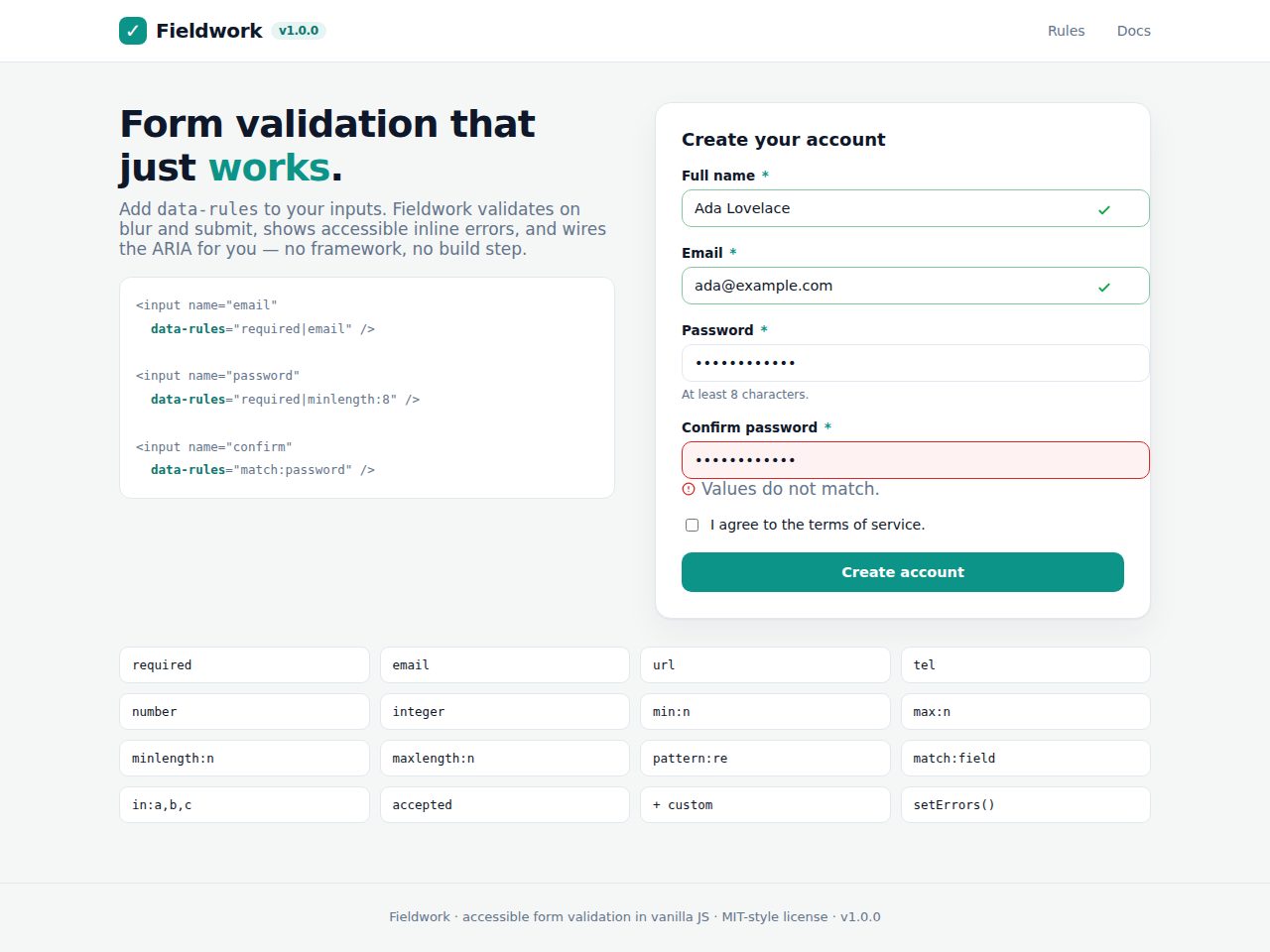
Preview and demo
Status: unchecked. Availability checks are not a security guarantee.
Description
Fieldwork is a small, dependency-free form validation & enhancement library in vanilla JavaScript. Add data-rules to your inputs and Fieldwork validates them on blur and submit, renders accessible inline error messages, wires the ARIA for you, and can handle async submission — no framework, no build step.
Highlights
- Declarative:
data-rules="required|email|minlength:8"; 14 built-in rules. - Accessible by default:
aria-invalid,aria-describedby, focus management,role=alert. - Validate on blur + submit; live re-validation after the first error.
- Custom rules & messages; honors native constraint attributes.
- Events + optional async submit (fetch JSON) with server-error display.
- Zero dependencies, no build step, ES modules; CSS-variable theming.
Features
Requirements
- A modern browser
- Node.js 18+ only to run the test suite
- Any toolchain that supports ES modules
Changelog
Frequently Asked Questions
Does Fieldwork require any frameworks, bundlers, or npm dependencies to run?
No — Fieldwork is completely dependency-free and written in vanilla JavaScript with ES modules, so it drops straight into any project with a plain script tag or module import and needs no build step. It works alongside any framework or none at all.
Which browsers does Fieldwork support?
Fieldwork targets any modern browser that supports ES modules and standard DOM APIs (Chrome, Firefox, Safari, Edge). No polyfills or transpilation are required for evergreen browsers.
How does Fieldwork handle accessibility — is it WCAG-compliant out of the box?
Accessibility is built in by default: Fieldwork automatically sets aria-invalid on invalid fields, links error messages via aria-describedby, uses role=alert for inline errors, and moves focus to the first invalid field on submit. You get correct ARIA wiring without writing a single accessibility attribute yourself.
Can I add my own validation rules and custom error messages, or am I limited to the 14 built-in ones?
Yes — Fieldwork supports fully custom rules alongside its 14 built-ins (required, email, match, minlength, and more). You can also supply per-field custom messages, so every error shown to users can match your product's tone and copy.
Does Fieldwork support async form submission and displaying server-side validation errors?
Yes — Fieldwork includes an optional async submit handler that posts your form data as JSON via fetch and surfaces server-returned errors inline using the setErrors() API. This means backend validation failures appear in the same accessible error UI as client-side ones.
What's included in the package and how is styling handled?
The package includes the Fieldwork JS library, a single ready-to-use stylesheet, and a node:test + jsdom test suite so you can verify behaviour in your own environment. All visual styling is controlled via CSS custom properties (variables), making theming as simple as overriding a handful of values in your own CSS.
Automated Security Scan Passed
- Product version:
- 1.0.0
- Archive verified:
- Yes
- Scan date:
- 27 July 2026
- Malware scan:
- Passed
- Secret detection:
- Passed
- Dependency scan:
- Not applicable
- Static analysis:
- Passed
A passed automated scan does not guarantee that the software is free from every vulnerability or security risk. The result applies only to this version. View scan methodology
Technical requirements
- See the detailed requirements in the product description below.
What is included
- Component library package with full downloadable files
- Product listing and product page guidance
- Product files ready for self-hosting or integration
- 10 listed features
- Changelog included on the product page
Who is this product for
- Buyers who need a component library rather than a custom build from scratch
- Teams shopping within JS Forms
- Use cases aligned with forms, form validation, validation, vanilla js
License and usage
- Regular license for one end product where end users are not charged for access to the item itself
- Extended license for one end product where end users can be charged
- Verify the exact usage rights on the selected license before deployment or client handoff
- Keep the purchase record and license certificate for future verification
Updates and support
- 6 months of seller support included
- Review the seller support scope before purchasing.
- Recent changes are visible in the product changelog
- Use the changelog to confirm ongoing maintenance before rollout
Technical details
- Current version
- 1.0.0
- Last updated
- Jul 11, 2026
- License options
- Regular, Extended
- Support period
- 6 months of seller support included
Marketplace review
Content review processNo completed marketplace review record is available for this product.
This is not a full penetration test or a guarantee that the product is vulnerability-free.
License comparison
A license is tied to one end product, not strictly to one domain. Development, staging, and the final production domain may belong to the same licensed deployment.
| Use | Regular License | Extended License |
|---|---|---|
| Source code modification | ||
| Own project use | ||
| One client project | ||
| One production deployment | ||
| Development and staging | ||
| Paid SaaS or paid user access | ||
| Multiple unrelated client projects | ||
| Redistribute source code | ||
| Resell source code |
License FAQ
Can I modify the source code?
Yes, under both licenses.
Can I use the script for a client?
Yes, for one client end product.
Can I install it on a staging domain?
Yes. Development and staging may belong to the licensed deployment.
Do I need another license for another client?
Yes, each unrelated client end product needs its own license.
Can I use it for a paid SaaS?
Yes, with an Extended License.
Can I resell the source code?
No. Standalone redistribution or resale is prohibited.
Is a license limited strictly to one domain?
No. It is tied to one end product, which may use development, staging, and production domains.
For one end product — free to end users
Item Details
- Last Update
- July 11, 2026
- Published
- June 12, 2026
- Version
- 1.0.0
- Category
- JS Forms
- Product Type
- Component library
- Sale Type
- Source Code License
- Sales
- 0
- Reviews
- No reviews
Buying guides
Share This Item
License Info
Regular License — Use in one end product which end users are not charged for.
Extended License — Use in one end product which end users can be charged for.
Verify a license key →