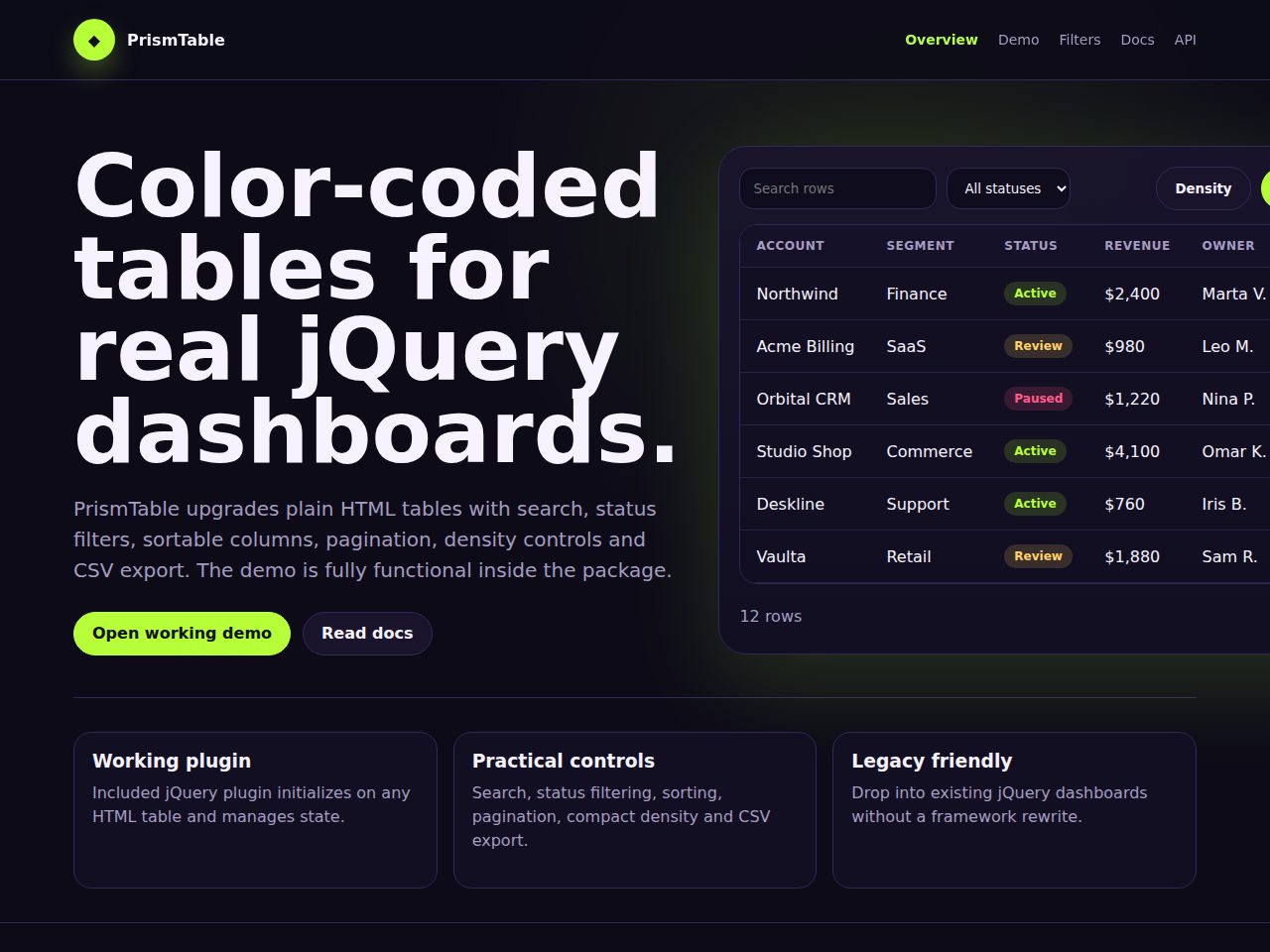
Preview and demo
Status: unchecked. Availability checks are not a security guarantee.
Description
PrismTable is a functional jQuery table enhancement plugin for existing admin panels and legacy dashboards. It upgrades plain HTML tables with live search, status filters, sortable headers, pagination, density controls and CSV export.
The package includes the plugin file, CSS theme, working demo pages, API documentation, examples and a neon lime on deep violet interface. The static demo works out of the box, while production projects can load official jQuery 3.x.
Features
Requirements
- jQuery 3.x
- Any modern browser
- No build step required
Changelog
Frequently Asked Questions
What files are included in the PrismTable package?
The package includes the jQuery plugin file, a CSS theme with the neon lime and deep violet palette, working demo pages, an API documentation page, and a basic example. The static demo works completely offline straight out of the box, so you can review everything before integrating it into your project.
Does PrismTable require React, Vue, or any other JavaScript framework?
No, PrismTable requires no framework — it runs on plain jQuery 3.x and works directly with semantic HTML tables. This makes it ideal for legacy admin panels and dashboards that are not built on a modern JS framework.
What version of jQuery does PrismTable need, and do I have to bundle it myself?
PrismTable is built for jQuery 3.x. The packaged static demo works offline without any extra setup, and for production projects you simply load the official jQuery 3.x library yourself before including the plugin.
Which table features does the plugin add, and can I see them working before I buy?
PrismTable adds live search, status filters, sortable column headers, pagination, a compact density toggle, and CSV export to any existing HTML table. A fully functional working demo is included in the package so you can try all of these features offline before purchasing.
Can I control the plugin programmatically, and what options are available through the API?
Yes, PrismTable ships with a documented plugin API that exposes options for pageSize, search, sort, and export. Full API documentation and example pages are included in the package to help you integrate and configure the plugin in your own project.
How much work is involved in changing the colour scheme or styling to match my project?
The plugin comes with a ready-made CSS theme using a neon lime and deep violet palette, which you can edit directly to match your own branding. Because the styling is delivered as a standard CSS file separate from the plugin logic, customising colours, fonts, or spacing requires no changes to the JavaScript.
Automated Security Scan Passed
- Product version:
- 1.0.0
- Archive verified:
- Yes
- Scan date:
- 27 July 2026
- Malware scan:
- Passed
- Secret detection:
- Passed
- Dependency scan:
- Not applicable
- Static analysis:
- Passed with 1 non-blocking finding
A passed automated scan does not guarantee that the software is free from every vulnerability or security risk. The result applies only to this version. View scan methodology
Technical requirements
- See the detailed requirements in the product description below.
What is included
- Plugin package with full downloadable files
- Product listing and product page guidance
- Product files ready for self-hosting or integration
- 10 listed features
- Changelog included on the product page
Who is this product for
- Buyers who need a plugin rather than a custom build from scratch
- Teams shopping within jQuery
- Use cases aligned with jquery plugin, data table, table plugin, admin table
License and usage
- Regular license for one end product where end users are not charged for access to the item itself
- Extended license for one end product where end users can be charged
- Verify the exact usage rights on the selected license before deployment or client handoff
- Keep the purchase record and license certificate for future verification
Updates and support
- 6 months of seller support included
- Review the seller support scope before purchasing.
- Recent changes are visible in the product changelog
- Use the changelog to confirm ongoing maintenance before rollout
Technical details
- Current version
- 1.0.0
- Last updated
- Jul 11, 2026
- License options
- Regular, Extended
- Support period
- 6 months of seller support included
Marketplace review
Content review processNo completed marketplace review record is available for this product.
This is not a full penetration test or a guarantee that the product is vulnerability-free.
License comparison
A license is tied to one end product, not strictly to one domain. Development, staging, and the final production domain may belong to the same licensed deployment.
| Use | Regular License | Extended License |
|---|---|---|
| Source code modification | ||
| Own project use | ||
| One client project | ||
| One production deployment | ||
| Development and staging | ||
| Paid SaaS or paid user access | ||
| Multiple unrelated client projects | ||
| Redistribute source code | ||
| Resell source code |
License FAQ
Can I modify the source code?
Yes, under both licenses.
Can I use the script for a client?
Yes, for one client end product.
Can I install it on a staging domain?
Yes. Development and staging may belong to the licensed deployment.
Do I need another license for another client?
Yes, each unrelated client end product needs its own license.
Can I use it for a paid SaaS?
Yes, with an Extended License.
Can I resell the source code?
No. Standalone redistribution or resale is prohibited.
Is a license limited strictly to one domain?
No. It is tied to one end product, which may use development, staging, and production domains.
For one end product — free to end users
Item Details
- Last Update
- July 11, 2026
- Published
- June 8, 2026
- Version
- 1.0.0
- Category
- jQuery
- Product Type
- Plugin
- Sale Type
- Source Code License
- Sales
- 0
- Reviews
- No reviews
Buying guides
Share This Item
License Info
Regular License — Use in one end product which end users are not charged for.
Extended License — Use in one end product which end users can be charged for.
Verify a license key →