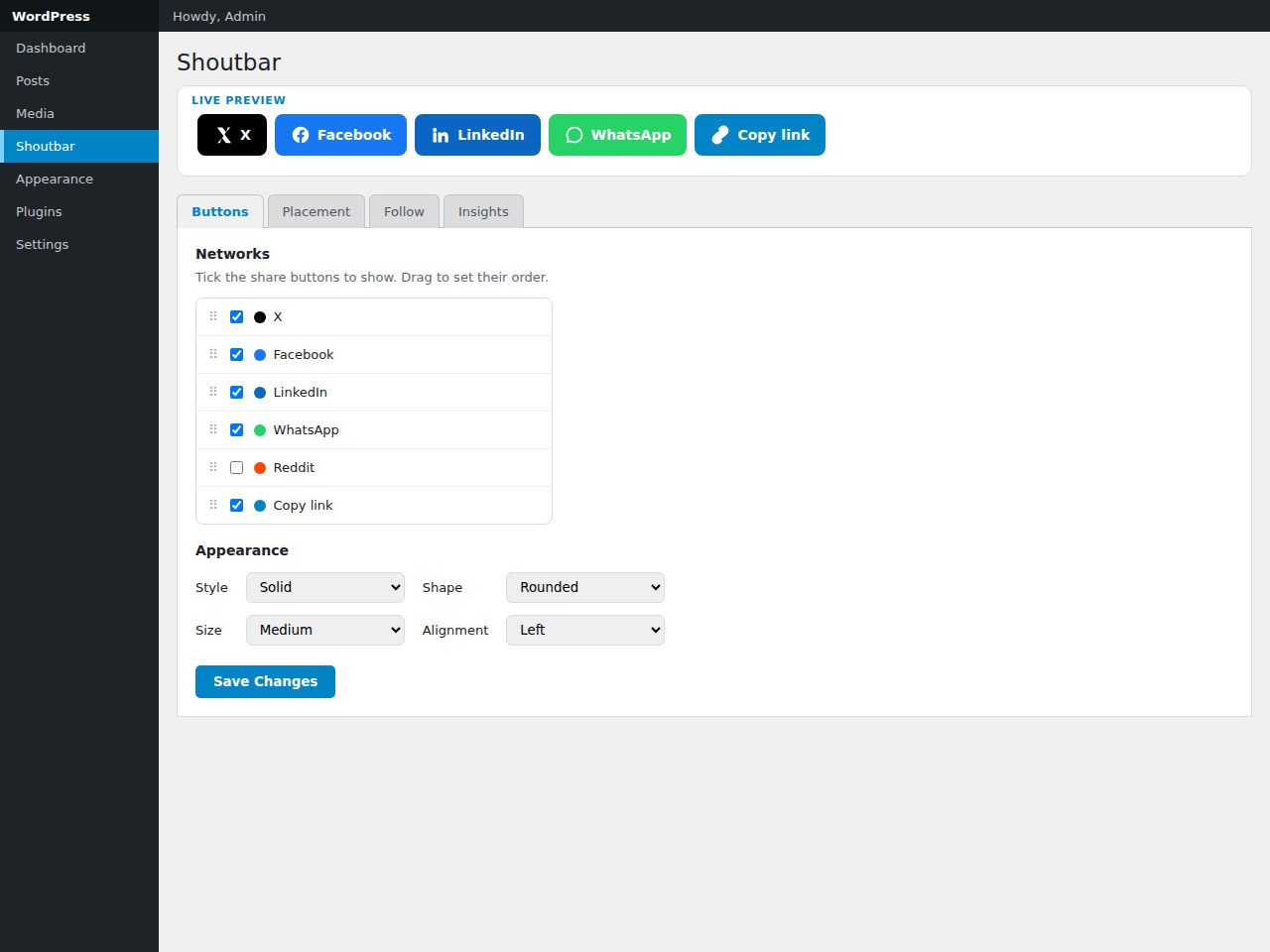
Preview and demo
Status: unchecked. Availability checks are not a security guarantee.
Description
Shoutbar gives publishers tidy share and follow buttons without the bloat of social SDKs. One settings screen — led by a live preview — lets you pick networks, drag them into order, and choose a style (solid, outline or minimal), shape, size, labels and alignment.
Decide where buttons appear: auto-inserted before/after content on the post types you choose, placed manually with the [shoutbar] shortcode or Shoutbar block, or shown in an optional floating bar (left rail on desktop, bottom bar on mobile). A separate follow-us set links to your own profiles via [shoutbar_follow].
No third-party JavaScript SDKs, tracking pixels or cookies — just plain share links and a tiny first-party script. Because the networks discontinued their public share-count APIs, Shoutbar doesn't fake global counts; it offers an honest, opt-in local click counter instead. Assets load only where buttons render. Built to WordPress standards — capability checks, nonce-verified AJAX, sanitised input, escaped output — translation-ready and accessible.
Highlights
- Share to X, Facebook, LinkedIn, Reddit, WhatsApp, Telegram, Pinterest, Email + Copy-link.
- Follow buttons for your own profiles (incl. Instagram, YouTube).
- Live-preview settings; drag to reorder networks.
- Auto-insert, shortcode, block, or optional floating bar.
- Opt-in privacy-friendly local click insights; no third-party scripts.
Features
Requirements
- WordPress 6.2+
- PHP 8.0+
- No build step required
Changelog
Frequently Asked Questions
Which social networks are supported for sharing and following?
Shoutbar supports share buttons for X (Twitter), Facebook, LinkedIn, Reddit, WhatsApp, Telegram, Pinterest, Email, and Copy-link. Follow buttons cover your own profiles on those networks plus Instagram and YouTube, linking visitors directly to your pages.
Does Shoutbar load any third-party scripts, tracking pixels, or cookies?
No — Shoutbar uses plain share links and a single small first-party script, with no third-party JavaScript SDKs, tracking pixels, or cookies of any kind. This keeps your site lean, fast, and compliant with privacy regulations without sacrificing functionality.
Will Shoutbar show public share counts for my posts?
No, because major social networks discontinued their public share-count APIs, Shoutbar does not display or fake global share counts. Instead, it offers an honest opt-in local click counter that privately tracks clicks in your own WordPress install — no external service required.
How can I control where the share and follow buttons appear on my site?
You have four placement options: auto-insert before and/or after content on the specific post types you choose, the [shoutbar] and [shoutbar_follow] shortcodes for manual placement, the native Shoutbar block in the WordPress block editor, or an optional floating bar (a left rail on desktop, a bottom bar on mobile).
What customisation options are available for the button appearance?
From a single settings screen with a live preview, you can choose a style (solid, outline, or minimal), button shape, size, labels, and alignment. You can also drag and drop networks into your preferred order, and all changes are reflected instantly in the live preview before you save.
Is Shoutbar built to WordPress coding standards, and is it translation-ready?
Yes — Shoutbar is built to WordPress standards including capability checks, nonce-verified AJAX, sanitised input, and escaped output. It is also fully translation-ready and loads assets only on pages where buttons actually render, so there is no unnecessary overhead on the rest of your site.
Automated Security Scan Passed
- Product version:
- 1.0.0
- Archive verified:
- Yes
- Scan date:
- 27 July 2026
- Malware scan:
- Passed
- Secret detection:
- Passed
- Dependency scan:
- Not applicable
- Static analysis:
- Passed
A passed automated scan does not guarantee that the software is free from every vulnerability or security risk. The result applies only to this version. View scan methodology
Technical requirements
- See the detailed requirements in the product description below.
What is included
- Plugin package with full downloadable files
- Product listing and product page guidance
- Product files ready for self-hosting or integration
- 9 listed features
- Changelog included on the product page
Who is this product for
- Buyers who need a plugin rather than a custom build from scratch
- Teams shopping within Social Plugins
- Use cases aligned with social share, share buttons, follow buttons, social media
License and usage
- Regular license for one end product where end users are not charged for access to the item itself
- Extended license for one end product where end users can be charged
- Verify the exact usage rights on the selected license before deployment or client handoff
- Keep the purchase record and license certificate for future verification
Updates and support
- 6 months of seller support included
- Review the seller support scope before purchasing.
- Recent changes are visible in the product changelog
- Use the changelog to confirm ongoing maintenance before rollout
Technical details
- Current version
- 1.0.0
- Last updated
- Jul 11, 2026
- License options
- Regular, Extended
- Support period
- 6 months of seller support included
Marketplace review
Content review processNo completed marketplace review record is available for this product.
This is not a full penetration test or a guarantee that the product is vulnerability-free.
License comparison
A license is tied to one end product, not strictly to one domain. Development, staging, and the final production domain may belong to the same licensed deployment.
| Use | Regular License | Extended License |
|---|---|---|
| Source code modification | ||
| Own project use | ||
| One client project | ||
| One production deployment | ||
| Development and staging | ||
| Paid SaaS or paid user access | ||
| Multiple unrelated client projects | ||
| Redistribute source code | ||
| Resell source code |
License FAQ
Can I modify the source code?
Yes, under both licenses.
Can I use the script for a client?
Yes, for one client end product.
Can I install it on a staging domain?
Yes. Development and staging may belong to the licensed deployment.
Do I need another license for another client?
Yes, each unrelated client end product needs its own license.
Can I use it for a paid SaaS?
Yes, with an Extended License.
Can I resell the source code?
No. Standalone redistribution or resale is prohibited.
Is a license limited strictly to one domain?
No. It is tied to one end product, which may use development, staging, and production domains.
For one end product — free to end users
Item Details
- Last Update
- July 11, 2026
- Published
- June 12, 2026
- Version
- 1.0.0
- Category
- Social Plugins
- Product Type
- Plugin
- Sale Type
- Source Code License
- Sales
- 0
- Reviews
- No reviews
Buying guides
Tags
Share This Item
License Info
Regular License — Use in one end product which end users are not charged for.
Extended License — Use in one end product which end users can be charged for.
Verify a license key →