Taskline — Project & Task Management (Laravel, Kanban)
Preview and demo
Status: unchecked. Availability checks are not a security guarantee.
Description
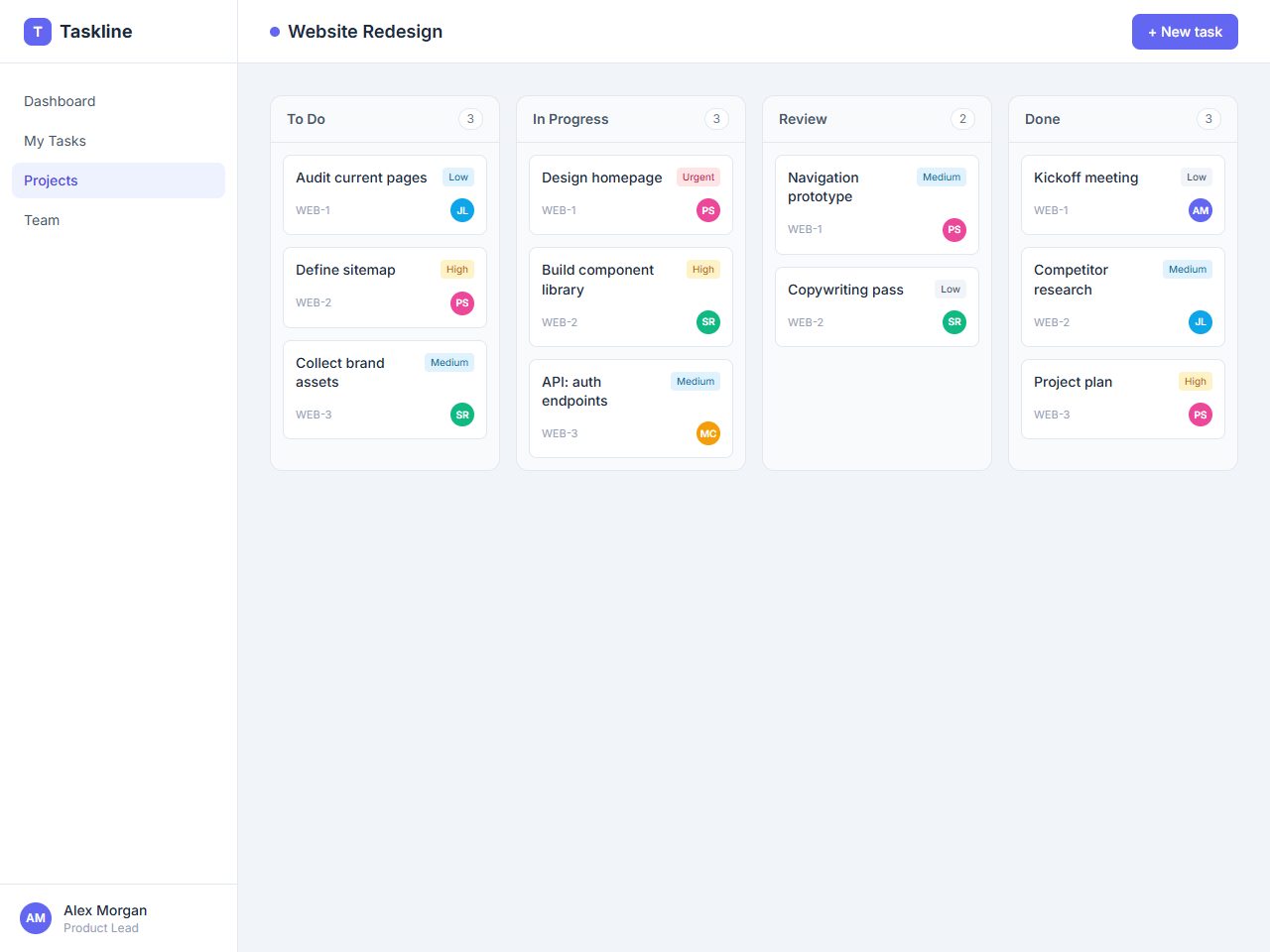
Taskline is a self-hosted project management app built with Laravel 11 and MySQL. It gives small teams a clean kanban board, projects, tasks, assignees, priorities, due dates, comments and a team directory — no SaaS fees, no monthly lock-in. Tailwind via CDN, custom authentication, no npm/Vite build step.
Each project has a To Do / In Progress / Review / Done board; move tasks between columns in one click. Tasks carry a priority, assignee, due date (with overdue highlighting) and threaded comments. A dashboard summarises active projects, open tasks, work due this week and completed items.
Highlights
- Kanban board per project with one-click status moves.
- Tasks: status, priority (low→urgent), assignee, due date, comments.
- Projects with colour, short key, progress bar, owner & archive.
- Team management (admin/member roles, avatars), My Tasks view & dashboard.
Features
Requirements
- PHP 8.2+
- Composer
- MySQL 5.7+ / MariaDB 10.3+
- No front-end build step (Tailwind via CDN)
Changelog
Frequently Asked Questions
What are the server requirements to run Taskline?
Taskline requires PHP 8.2+ (compatible with Laravel 11), a MySQL database, and a web server such as Apache or Nginx. Because Tailwind CSS is loaded via CDN and there is no Vite/npm build step, no Node.js environment is needed on the server. Standard shared or VPS hosting that supports Laravel will work.
Is this a self-hosted script or a SaaS subscription?
Taskline is a fully self-hosted PHP script — you download the source code, deploy it on your own server, and own it outright. There are no SaaS fees, no monthly charges, and no third-party service lock-in.
What is included in the download to help me get started quickly?
The download includes the complete Laravel 11 source code along with a database seeder that pre-populates the app with an admin account, four team members, three sample projects, and 36 tasks across the kanban board. This lets you explore every feature immediately after setup without entering dummy data manually.
Can I customise the code — for example, add new columns, fields, or branding?
Yes. You receive the full, unencrypted Laravel source code, so you can modify controllers, models, Blade templates, and routes to suit your needs. Tailwind CSS classes are applied directly in the templates with no build step required, making visual changes straightforward.
How does team access control work — can I restrict what regular members can do?
Taskline includes two roles: admin and member. Admins manage the team directory, create and archive projects, and have full control over tasks, while members can work within projects they are assigned to. Avatars are supported for all team members to personalise the directory.
Does Taskline include any built-in authentication, or do I need to integrate a separate auth package?
Taskline ships with its own custom authentication system — login and session management are built in without relying on Laravel Breeze, Jetstream, or any third-party auth package. No additional setup or packages are required to secure your installation.
Automated Security Scan Passed
- Product version:
- 1.0.0
- Archive verified:
- Yes
- Scan date:
- 27 July 2026
- Malware scan:
- Passed
- Secret detection:
- Passed
- Dependency scan:
- Not applicable
- Static analysis:
- Passed
A passed automated scan does not guarantee that the software is free from every vulnerability or security risk. The result applies only to this version. View scan methodology
Technical requirements
- See the detailed requirements in the product description below.
What is included
- Full application package with full downloadable files
- Product listing and product page guidance
- Product files ready for self-hosting or integration
- 9 listed features
- Changelog included on the product page
Who is this product for
- Buyers who need a full application rather than a custom build from scratch
- Teams shopping within Project Management
- Use cases aligned with project management, laravel, kanban board, task management
License and usage
- Regular license for one end product where end users are not charged for access to the item itself
- Extended license for one end product where end users can be charged
- Verify the exact usage rights on the selected license before deployment or client handoff
- Keep the purchase record and license certificate for future verification
Updates and support
- 6 months of seller support included
- Review the seller support scope before purchasing.
- Recent changes are visible in the product changelog
- Use the changelog to confirm ongoing maintenance before rollout
Technical details
- Current version
- 1.0.0
- Last updated
- Sep 8, 2026
- License options
- Regular, Extended
- Support period
- 6 months of seller support included
Marketplace review
Content review processNo completed marketplace review record is available for this product.
This is not a full penetration test or a guarantee that the product is vulnerability-free.
License comparison
A license is tied to one end product, not strictly to one domain. Development, staging, and the final production domain may belong to the same licensed deployment.
| Use | Regular License | Extended License |
|---|---|---|
| Source code modification | ||
| Own project use | ||
| One client project | ||
| One production deployment | ||
| Development and staging | ||
| Paid SaaS or paid user access | ||
| Multiple unrelated client projects | ||
| Redistribute source code | ||
| Resell source code |
License FAQ
Can I modify the source code?
Yes, under both licenses.
Can I use the script for a client?
Yes, for one client end product.
Can I install it on a staging domain?
Yes. Development and staging may belong to the licensed deployment.
Do I need another license for another client?
Yes, each unrelated client end product needs its own license.
Can I use it for a paid SaaS?
Yes, with an Extended License.
Can I resell the source code?
No. Standalone redistribution or resale is prohibited.
Is a license limited strictly to one domain?
No. It is tied to one end product, which may use development, staging, and production domains.
Related Items
For one end product — free to end users
Item Details
- Last Update
- September 8, 2026
- Published
- June 5, 2026
- Version
- 1.0.0
- Category
- Project Management
- Product Type
- Full application
- Sale Type
- Source Code License
- Sales
- 0
- Reviews
- No reviews
Tags
Share This Item
License Info
Regular License — Use in one end product which end users are not charged for.
Extended License — Use in one end product which end users can be charged for.
Verify a license key →