Smart Product Filter Pro for WooCommerce
Preview and demo
Status: unchecked. Availability checks are not a security guarantee.
Description
Smart Product Filter Pro for WooCommerce
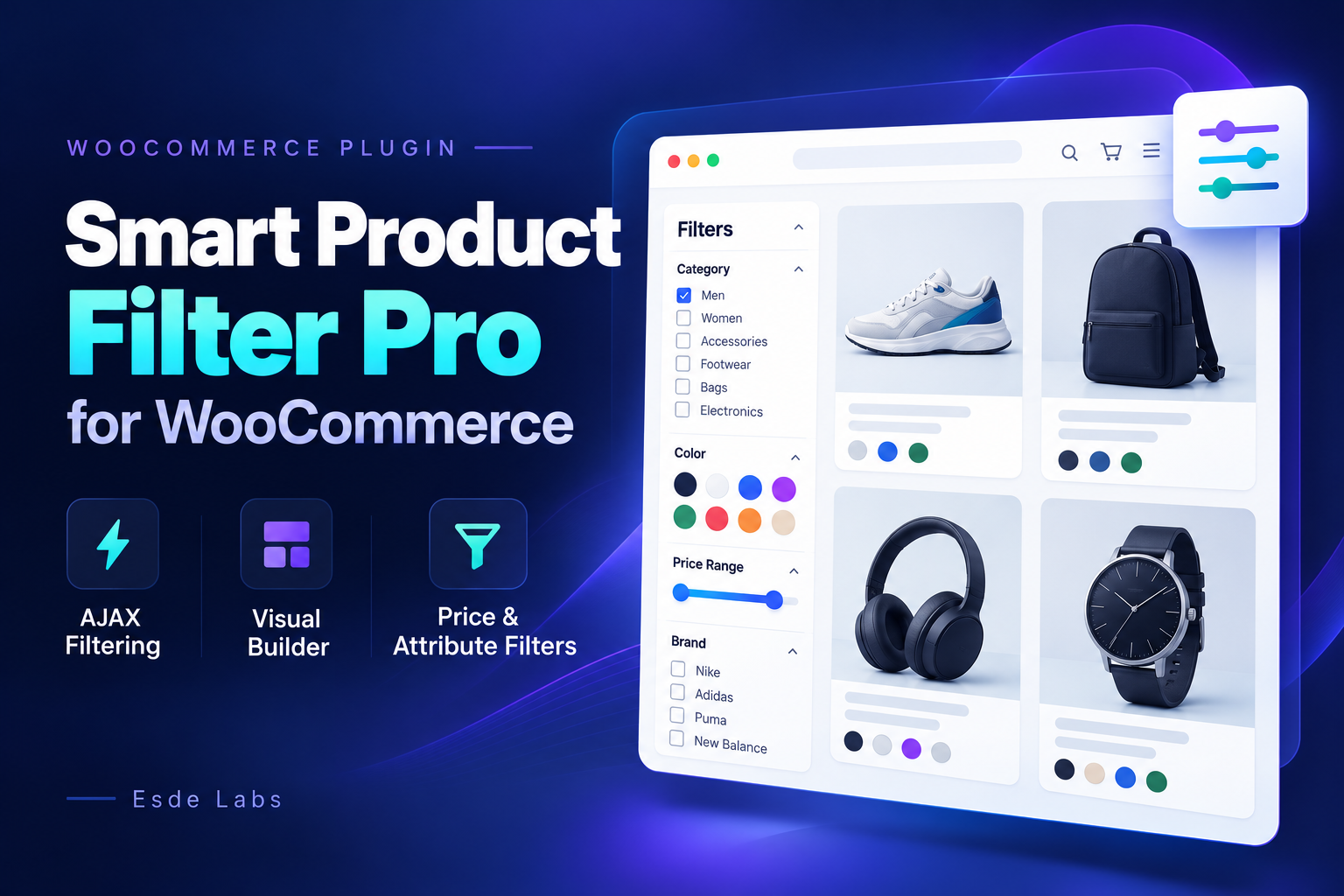
Help shoppers find the right products with flexible filters for categories, attributes, price, rating, stock status, sale items, tags and search. Build filter sets visually and place them on your WooCommerce shop and product archive pages.
Smart Product Filter Pro combines AJAX filtering, dynamic product counts, price sliders and attribute swatches with configurable display rules. Supported archives update without a full page reload, while standard page-based filtering remains available when JavaScript is unavailable.
Key Features
- 8 filter types covering the main WooCommerce catalog properties.
- Visual filter builder with drag-and-drop and keyboard ordering.
- AJAX filtering with pagination, sorting and browser history support.
- Dynamic facet counts that reflect the current filter selection.
- Price sliders with dynamic bounds and numeric input fallback.
- Attribute swatches with color, image and text choices.
- Display rules with include/exclude conditions and ALL/ANY matching.
- Flexible placement through automatic hooks, shortcodes and widgets.
- SEO controls for filtered archive indexing and canonical URLs.
- Optional product index with automatic native-query fallback.
- JSON import and export for filter sets and plugin settings.
- Diagnostics and maintenance tools inside WooCommerce administration.
8 Built-In Filter Types
- Product Categories: category lists or dropdowns, child-category support and match-any or match-all selection.
- Product Attributes: filter by WooCommerce attributes such as size, color, material or brand when configured as an attribute.
- Price: numeric ranges, sliders or combined slider and input controls.
- Rating: filter by a minimum rating or an exact rating.
- Stock Status: offer configurable stock-status choices.
- On Sale: show products currently on sale.
- Product Tags: tag lists, dropdowns or buttons.
- Search: search products alongside other active filters.
Combine multiple filters in a single set. Products must satisfy every active filter, while supported taxonomy filters offer configurable matching within their selected values.
Visual Filter Set Builder
Manage filter sets directly under WooCommerce > Product Filters. Add filters from a palette, arrange their order and configure their behavior without editing plugin files.
- Create, edit, duplicate, enable, disable and delete filter sets.
- Reorder filters using drag-and-drop or keyboard controls.
- Configure single or multiple selection where supported.
- Choose available display styles for each filter type.
- Use vertical or horizontal layouts.
- Review field-level validation and sample query previews.
- Receive conflict warnings when another administrator has changed the same set.
AJAX Filtering & Shareable URLs
On supported WooCommerce archives, shoppers can refine results without reloading the entire page. Filter selections stay synchronized with the URL, pagination, sorting and browser Back/Forward navigation.
- Automatic AJAX application with debounced search and price changes.
- Apply and Clear controls.
- Canonical filter URLs that can be bookmarked and shared.
- Coordinated filter forms when multiple sets appear on one page.
- Loading states and result announcements.
- Full-page fallback when AJAX fails or the request is unsupported.
Price Sliders, Swatches & Dynamic Counts
Choose controls that suit your catalog: category trees, native dropdowns, tag buttons, attribute swatches and price sliders.
- Color and image swatches configured on WooCommerce attribute terms.
- Text choices and native input fallbacks.
- Search within supported facet lists.
- Collapsible filter sections.
- Dynamic counts for available filter choices.
- Price bounds calculated from the relevant catalog selection.
Variable products match a price range when their minimum-to-maximum variation price interval overlaps the selected range, following WooCommerce's native price-filter behavior.
Display Rules & Flexible Placement
Control where a filter set appears and where its selections apply. Combine targeting conditions using ALL or ANY matching, with include and exclude rules.
- Target shop and product taxonomy archive contexts.
- Use category descendants and taxonomy-term conditions.
- Apply supported product, user and role conditions.
- Place filters before or after products, in the WooCommerce sidebar or through custom hooks.
- Insert filters manually using a shortcode or the Smart Product Filter widget.
Shortcode examples:
[rspf_filters]
[rspf_filters id="12"]
[rspf_filters slug="shop-filters" layout="horizontal"]
Replace the example ID or slug with your own filter set. Shortcodes and widgets respect the same targeting rules used by the filtering engine.
SEO Controls for Filtered Archives
Manage how active filtered archive pages are presented to search engines. By default, authorized filtered pages use noindex,follow and point their canonical URL to the unfiltered archive.
- Configurable robots and canonical policies.
- Unfiltered pages retain their existing SEO owner.
- Developer hooks for adapting SEO behavior.
Optional Product Index
Filtering works through WooCommerce without building an additional index. For supported query scenarios, you can enable an optional SQL product and term index through an explicit rebuild.
- Bounded, resumable index builds.
- Incremental synchronization with WooCommerce product changes.
- Index rebuild, verification and clearing tools.
- Automatic native-query fallback when the index is missing, stale or unavailable.
- WP-CLI commands for maintenance.
Performance depends on the catalog, hosting environment and query. The optional index is not guaranteed to be faster than WooCommerce's native query path.
Import, Export & Diagnostics
- Export and import filter sets as JSON.
- Transfer supported taxonomy and product references using slugs and SKUs.
- Import filter sets in a disabled state for review before enabling.
- Regenerate internal identifiers during import.
- Import and export plugin settings separately.
- Review system status and copy a sanitized support report.
- Maintain the product index and preview scoped orphan cleanup.
Developer Friendly & Translation Ready
- Extension hooks and registries for custom filter types and renderers.
- Theme template overrides with child-theme priority.
- Permission-protected administration REST API.
- Lightweight storefront JavaScript without jQuery or React runtime dependencies.
- Frontend assets loaded only where filter sets are displayed.
- English interface with a POT translation template included.
- Data preserved on uninstall by default, with optional plugin-data removal.
Requirements & Compatibility
- WordPress: 6.5 or newer.
- WooCommerce: 8.5 or newer.
- PHP: 8.1 or newer.
- Primary integration: classic WooCommerce shop and product archive loops.
- HPOS: compatible; the plugin does not access order storage.
Please note: WooCommerce Product Collection blocks may bypass the classic product query and placement hooks. Full Product Collection block integration and Elementor-specific integration are not included in version 1.0.0.
Price controls use raw WooCommerce catalog prices with store currency formatting. Tax-inclusive price conversion is not performed.
Getting Started
- Install and activate WooCommerce.
- Upload the plugin ZIP through Plugins > Add New > Upload Plugin.
- Activate Smart Product Filter Pro.
- Open WooCommerce > Product Filters and create a filter set.
- Add filters, configure targeting and choose a placement.
- Enable the set and check it on a matching product archive.
Changelog
Version 1.0.0 — First Stable Release
- Eight built-in filter types and a visual filter set builder.
- Classic and AJAX filtering with URL state and browser history.
- Dynamic counts, price sliders and attribute swatches.
- Display rules, automatic placement, shortcodes and widgets.
- Filtered archive SEO controls and optional product indexing.
- Settings, JSON import/export, diagnostics and maintenance tools.
Features
Requirements
System Requirements
- WordPress: 6.5 or newer.
- WooCommerce: 8.5 or newer, installed and active.
- PHP: 8.1 or newer.
- Theme: a theme using classic WooCommerce shop and product archive loops.
- JavaScript: required for the visual admin builder and AJAX filtering. Storefront filtering also supports full-page requests without JavaScript.
Compatibility Notes
- WooCommerce HPOS compatible.
- Full WooCommerce Product Collection block integration is not included in version 1.0.0.
- Elementor-specific integration is not included in version 1.0.0.
- Price filtering uses raw WooCommerce catalog prices without tax-inclusive conversion.
- The optional product index requires an explicit rebuild; it is not required for standard filtering.
Changelog
Version 1.0.0 — Initial Stable Release
- Added eight filter types: categories, attributes, price, rating, stock status, on-sale products, tags and search.
- Added a visual filter set builder with drag-and-drop ordering.
- Added AJAX filtering, shareable URLs and browser Back/Forward support.
- Added dynamic facet counts, price sliders and attribute swatches.
- Added display rules, automatic placement, shortcodes and widgets.
- Added filtered archive SEO controls and an optional product index.
- Added settings, JSON import/export, diagnostics and maintenance tools.
- Included full-page filtering fallback when JavaScript is unavailable.
- Included a POT translation template and developer extension hooks.
Frequently Asked Questions
Does the plugin support AJAX filtering?
Yes. Supported WooCommerce product archives update without a full page reload, including pagination and sorting. Filter URLs and browser history stay synchronized. Full-page filtering remains available when JavaScript is unavailable.
Can I choose where the filters appear?
Yes. Use automatic placement, the Smart Product Filter widget or the [rspf_filters] shortcode. Display rules control which shop and product archive pages each filter set applies to.
Does it work with WooCommerce block themes?
Version 1.0.0 integrates with classic WooCommerce shop and product archive loops. Product Collection blocks may bypass these hooks, so full block-based product filtering is not supported.
Automated scan awaiting manual review
The automated scan for version 1.0.0 flagged items that a reviewer must confirm. No scan result is shown until that review is finished. How product review works
Technical requirements
- WooCommerce
- Shared hosting compatible
What is included
- Downloadable product files
- Documentation included for installation and setup
- Readable source code for customization
- 12 listed features
- Changelog included on the product page
Who is this product for
- Teams shopping within eCommerce Plugins
- Projects already using JavaScript, React, HTML5
- Use cases aligned with woocommerce, product filter, ajax filter, woocommerce filter
License and usage
- Regular license for one end product where end users are not charged for access to the item itself
- Verify the exact usage rights on the selected license before deployment or client handoff
- Keep the purchase record and license certificate for future verification
Updates and support
- 6 months of seller support included
- Review the seller support scope before purchasing.
- Recent changes are visible in the product changelog
- Use the changelog to confirm ongoing maintenance before rollout
Technical details
- Last updated
- Oct 14, 2026
- PHP
- 8.1+
- Framework
- WooCommerce 8.5
- Frontend stack
- JavaScript, React, HTML5, CSS3, Sass (SCSS), WordPress Components
- Shared hosting
- Yes
- Docker
- No
- Composer required
- No
- Node.js required
- No
- Documentation
- Yes
- Source encrypted
- No
- Source obfuscated
- No
- License options
- Regular
- Support period
- 6 months of seller support included
Marketplace review
Content review processReviewed 14. 10. 2026. The current version was reviewed.
The marketplace reviewed the listing content, package structure and required documentation.
Automated checks looked for suspicious files and common malware indicators.
A reviewer manually inspected selected source files and implementation details.
The product received an additional security-focused review beyond the baseline listing checks.
This is not a full penetration test or a guarantee that the product is vulnerability-free.
License comparison
A license is tied to one end product, not strictly to one domain. Development, staging, and the final production domain may belong to the same licensed deployment.
| Use | Regular License | Extended License |
|---|---|---|
| Source code modification | ||
| Own project use | ||
| One client project | ||
| One production deployment | ||
| Development and staging | ||
| Paid SaaS or paid user access | ||
| Multiple unrelated client projects | ||
| Redistribute source code | ||
| Resell source code |
License FAQ
Can I modify the source code?
Yes, under both licenses.
Can I use the script for a client?
Yes, for one client end product.
Can I install it on a staging domain?
Yes. Development and staging may belong to the licensed deployment.
Do I need another license for another client?
Yes, each unrelated client end product needs its own license.
Can I use it for a paid SaaS?
Yes, with an Extended License.
Can I resell the source code?
No. Standalone redistribution or resale is prohibited.
Is a license limited strictly to one domain?
No. It is tied to one end product, which may use development, staging, and production domains.
For one end product — free to end users
Item Details
- Last Update
- October 14, 2026
- Published
- October 14, 2026
- Version
- 1.0
- Category
- eCommerce Plugins
- Product Type
- Not specified
- Sale Type
- Source Code License
- Sales
- 0
- Reviews
- No reviews
Buying guides
Tags
Share This Item
License Info
Regular License — Use in one end product which end users are not charged for.
Extended License — Use in one end product which end users can be charged for.
Verify a license key →