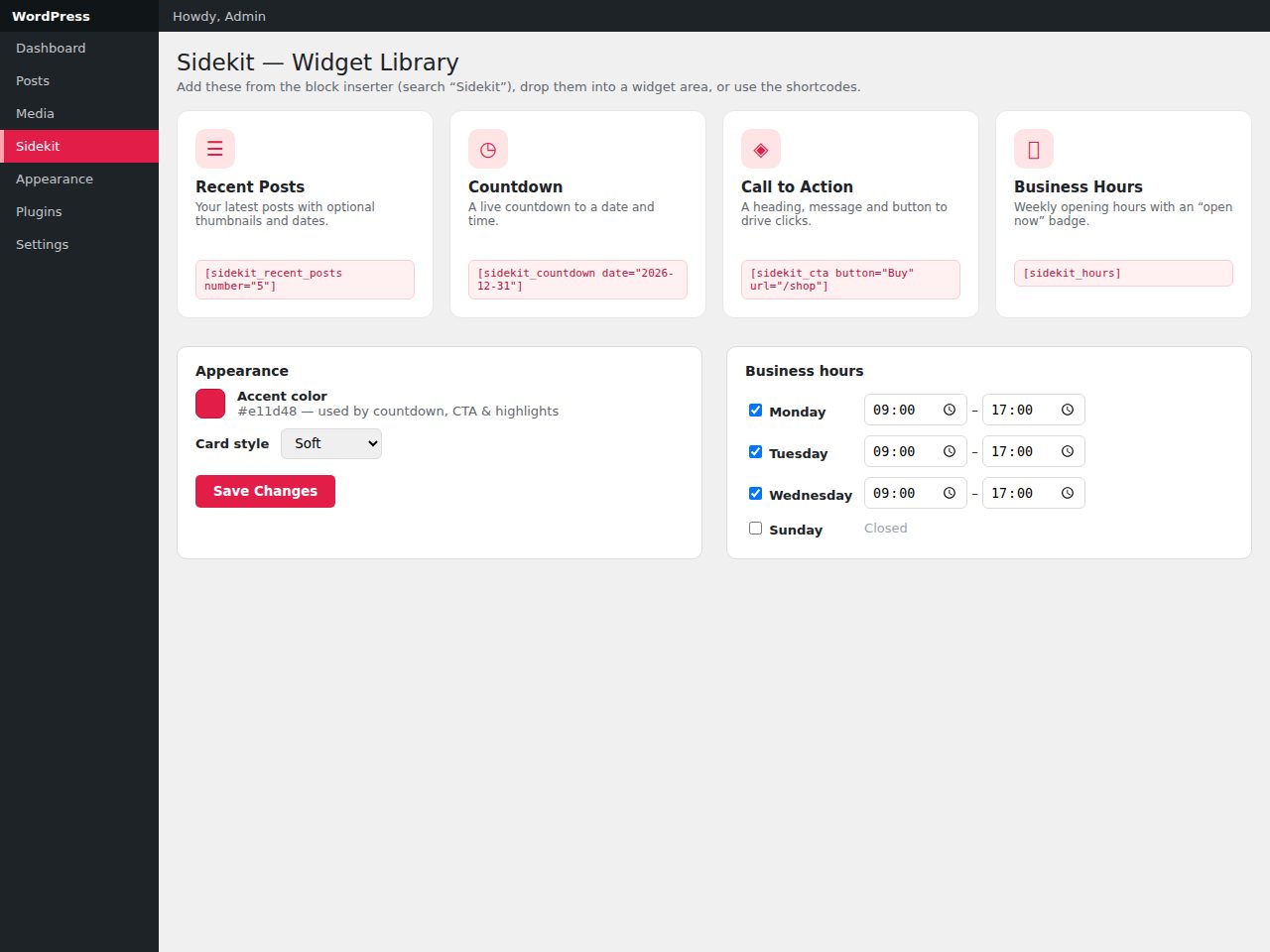
Preview and demo
Status: unchecked. Availability checks are not a security guarantee.
Description
Sidekit gives you the handful of widgets most sites actually need, done properly — not a 40-widget kitchen sink. Recent Posts lists your latest content with optional thumbnails, dates and a category filter. Countdown ticks down to any date and time and swaps to a custom message when it ends. Call to Action pairs a heading and message with a button. Business Hours shows your weekly opening times, can highlight today, and displays an “Open now / Closed” badge in your site timezone.
Every widget is a native block (and works in the block-based Widgets screen), with a matching shortcode for classic themes. Pick one accent color and a card style (soft, bordered or flat) and the whole pack stays consistent. Widgets render on the server so their content is always current, and front-end assets load only on pages that use a Sidekit widget — the countdown script only when a countdown is present. Built to WordPress standards — capability checks, sanitised input, escaped output — no build step, translation-ready and accessible.
Highlights
- Four blocks: Recent Posts, Countdown, Call to Action, Business Hours.
- Matching shortcodes; works in block-based widget areas.
- One accent color + three card styles (soft/bordered/flat).
- Business-hours editor with an “open now” badge.
- Server-rendered; conditional asset loading; accessible.
Features
Requirements
- WordPress 6.2+
- PHP 8.0+
- No build step required
Changelog
Frequently Asked Questions
Which widgets and blocks are included in Sidekit?
Sidekit includes exactly four blocks: Recent Posts, Countdown, Call to Action, and Business Hours. Every block also comes with a matching shortcode so it works equally well in classic (non-block) themes. There are no other widgets beyond these four — Sidekit is intentionally focused rather than a large all-in-one bundle.
Does Sidekit work with classic themes, or only block-based (Full Site Editing) themes?
It works with both. Each widget is a native Gutenberg block and is fully compatible with the block-based Widgets screen, but every block also has a matching shortcode you can drop into any classic theme via a text widget, template file, or page builder.
How much can I customise the appearance of the widgets?
You can set a single accent color that applies consistently across all four widgets, and choose from three card styles — soft, bordered, or flat. The Business Hours block can also highlight today's row and displays a live Open/Closed badge based on your site's timezone. Beyond these options, Sidekit does not expose a large style library, keeping the design intentionally cohesive.
Will Sidekit slow down my site by loading extra scripts and styles on every page?
No — Sidekit uses conditional asset loading, so front-end CSS and JavaScript are only enqueued on pages that actually contain a Sidekit widget. The countdown script, for example, is loaded only on pages where a Countdown block is present, leaving all other pages completely unaffected.
What happens to my data if I decide to uninstall the plugin?
Sidekit includes an opt-in data removal feature on uninstall, meaning you can choose to have all plugin data cleanly removed from your database when you delete it. This is opt-in, so your data is preserved by default unless you explicitly enable removal before uninstalling.
What are the requirements, and does setting up Sidekit require any build tools or compilation steps?
Sidekit is a standard WordPress plugin with no build step required — there is nothing to compile, bundle, or configure before use. It is built to WordPress coding standards with capability checks, sanitised input, and escaped output, and it is translation-ready and accessible out of the box.
Automated Security Scan Passed
- Product version:
- 1.0.0
- Archive verified:
- Yes
- Scan date:
- 27 July 2026
- Malware scan:
- Passed
- Secret detection:
- Passed
- Dependency scan:
- Not applicable
- Static analysis:
- Passed
A passed automated scan does not guarantee that the software is free from every vulnerability or security risk. The result applies only to this version. View scan methodology
Technical requirements
- See the detailed requirements in the product description below.
What is included
- Plugin package with full downloadable files
- Product listing and product page guidance
- Product files ready for self-hosting or integration
- 8 listed features
- Changelog included on the product page
Who is this product for
- Buyers who need a plugin rather than a custom build from scratch
- Teams shopping within Widgets
- Use cases aligned with widgets, blocks, recent posts, countdown
License and usage
- Regular license for one end product where end users are not charged for access to the item itself
- Extended license for one end product where end users can be charged
- Verify the exact usage rights on the selected license before deployment or client handoff
- Keep the purchase record and license certificate for future verification
Updates and support
- 6 months of seller support included
- Review the seller support scope before purchasing.
- Recent changes are visible in the product changelog
- Use the changelog to confirm ongoing maintenance before rollout
Technical details
- Current version
- 1.0.0
- Last updated
- Jul 11, 2026
- License options
- Regular, Extended
- Support period
- 6 months of seller support included
Marketplace review
Content review processNo completed marketplace review record is available for this product.
This is not a full penetration test or a guarantee that the product is vulnerability-free.
License comparison
A license is tied to one end product, not strictly to one domain. Development, staging, and the final production domain may belong to the same licensed deployment.
| Use | Regular License | Extended License |
|---|---|---|
| Source code modification | ||
| Own project use | ||
| One client project | ||
| One production deployment | ||
| Development and staging | ||
| Paid SaaS or paid user access | ||
| Multiple unrelated client projects | ||
| Redistribute source code | ||
| Resell source code |
License FAQ
Can I modify the source code?
Yes, under both licenses.
Can I use the script for a client?
Yes, for one client end product.
Can I install it on a staging domain?
Yes. Development and staging may belong to the licensed deployment.
Do I need another license for another client?
Yes, each unrelated client end product needs its own license.
Can I use it for a paid SaaS?
Yes, with an Extended License.
Can I resell the source code?
No. Standalone redistribution or resale is prohibited.
Is a license limited strictly to one domain?
No. It is tied to one end product, which may use development, staging, and production domains.
For one end product — free to end users
Item Details
- Last Update
- July 11, 2026
- Published
- June 12, 2026
- Version
- 1.0.0
- Category
- Widgets
- Product Type
- Plugin
- Sale Type
- Source Code License
- Sales
- 0
- Reviews
- No reviews
Buying guides
Tags
Share This Item
License Info
Regular License — Use in one end product which end users are not charged for.
Extended License — Use in one end product which end users can be charged for.
Verify a license key →