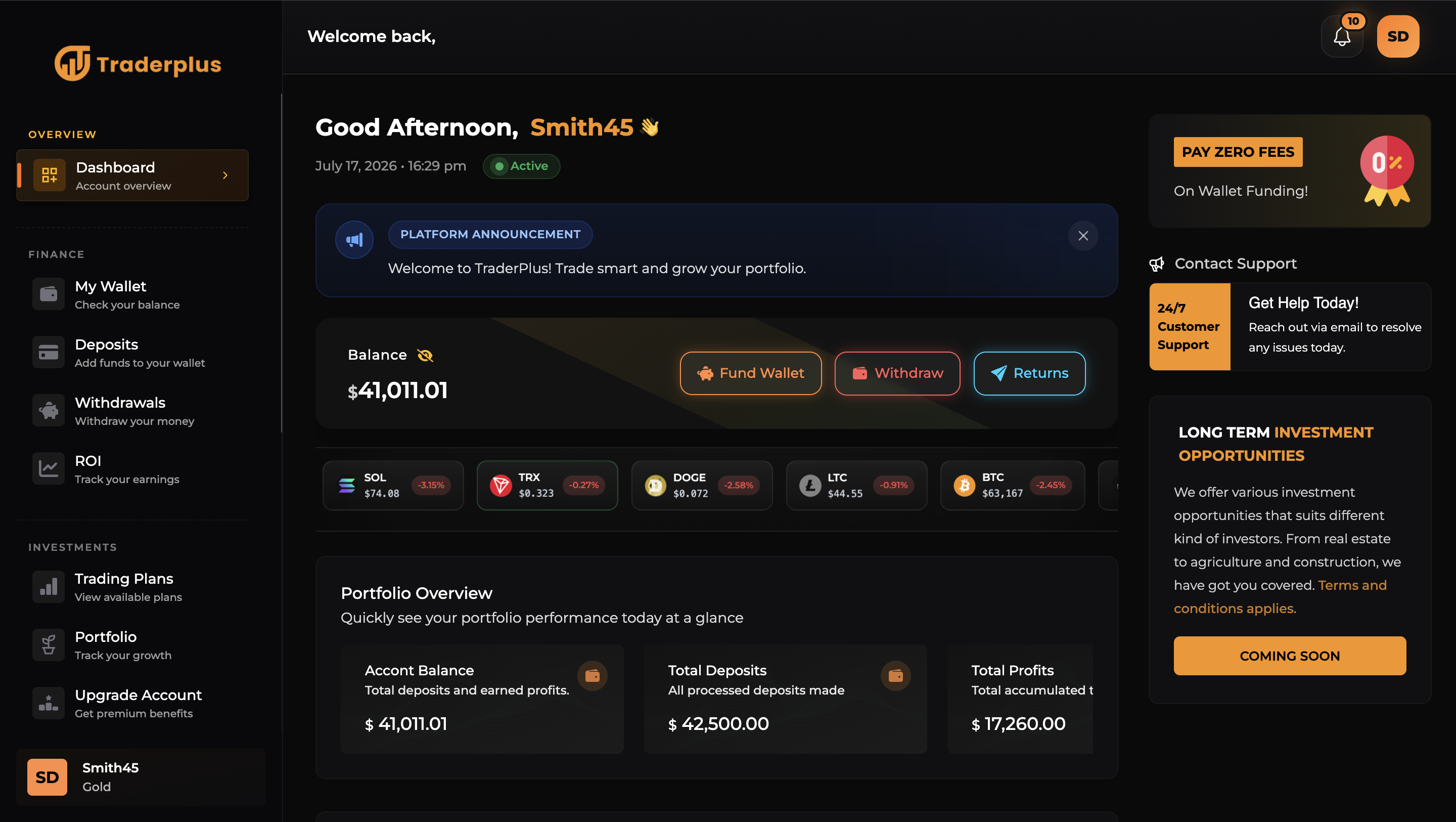
Traderplus - Modern Crypto and Forex Fund Management, Signals And Education Script
Preview and demo
Status: available · Last verified 17. 10. 2026. Availability checks are not a security guarantee.
Description
TraderPlus is a modern, customizable, white-label web application designed for businesses that want to operate a forex, cryptocurrency, trading-signals, or fund-management platform from one centralized system.
The platform provides a professional environment where businesses can present their financial services, onboard customers, manage user accounts, organize fund management offerings, distribute trading information, publish educational content, and oversee day-to-day platform activity.
Traderplus can be customized to match different brands and business models. Operators can adjust the platform’s identity, website information, customer packages, service offerings, payment options, content, and general configuration. This makes it suitable for startups, established companies, trading communities, financial educators, and agencies building platforms for clients.
The product is suitable for businesses operating in areas such as forex education, cryptocurrency information, trading-signal subscriptions, investment portfolio management, copy-trading presentation, financial education, fintech demonstrations, and other finance-related online services.
Its white-label structure allows buyers to launch the software under their own business name and visual identity. It can be used as a ready-made foundation or further customized to meet specific operational, branding, regulatory, and customer-experience requirements.
TraderPlus is intended to reduce the cost and development time associated with creating a financial-management platform from the ground up. It offers buyers a flexible starting point that can be adapted as their audience, services, and business requirements grow.
Some of the features includes the following
Public website
Professional landing page
Forex trading page
Cryptocurrency trading page
Trading signals page
Financial education and courses page
About Us page
Contact Us page
Responsive navigation
Customizable website branding
Configurable contact information
Social-media links
Search-engine metadata
Custom website title and description
Custom logo, dark logo and favicon
Custom website banner
Custom loading logo
Social-sharing image
Configurable footer content
Terms and Conditions link
Privacy Policy link
Risk Disclosure link
Live-chat integration support
WhatsApp support link
Announcement banner
Multilingual content translation
Registration and authentication
Customer registration
Email OTP registration verification
Multi-step profile completion
Secure customer login
Separate administrator login
Email-address verification
Forgotten-password recovery
Password-reset functionality
Password-confirmation protection
Two-factor authentication
Two-factor challenge screen
Two-factor QR-code setup
Two-factor recovery codes
Recovery-code regeneration
Configurable login availability
Configurable registration availability
Configurable email-verification requirement
Configurable login-attempt limit
Optional login notifications
Google reCAPTCHA support
Role-based customer and administrator access
Protected dashboard routes
Custom access-denied page
Custom session-expired page
Custom not-found page
Custom server-error page
Customer dashboard
Personalized dashboard overview
Account summary
Wallet overview
Balance information
Recent transaction information
Investment overview
Active-plan overview
Portfolio overview
Trading opportunities
Account status display
Account-type display
Dashboard navigation
Responsive customer interface
Dashboard announcements
Account-manager contact access
Customer profile management
View personal account information
Update profile information
Complete customer profile
Change account password
Manage account preferences
Manage profile details
Manage security settings
Two-factor authentication management
Appearance settings
Account-verification status
Account-type information
Account-upgrade access
KYC verification
Customer KYC application
Identity-document submission
KYC status tracking
Administrative KYC review
KYC approval
KYC rejection
Optional automatic KYC approval
Optional KYC requirement for deposits
Optional KYC requirement for withdrawals
Verified and unverified account states
Wallet and transaction management
Customer wallet page
Wallet-balance display
Deposit history
Withdrawal history
ROI transaction history
Transaction references
Transaction-status tracking
Transaction-channel tracking
Transaction-date tracking
Deposit and withdrawal records
Successful-transaction confirmation page
Deposit management
Customer deposit submission
Fiat deposit support
Bank deposit support
Cryptocurrency deposit support
Crypto checkout page
Fiat checkout interface
Multiple configurable payment methods
Payment instructions
Crypto wallet-address display
Deposit-proof submission support
Pending deposit status
Approved deposit status
Rejected or declined status
Configurable minimum deposit
Configurable maximum deposit
Ability to enable or disable crypto deposits
Ability to enable or disable bank deposits
Administrative deposit review
Administrative deposit confirmation
Automatic account updates after approved transactions
Withdrawal management
Customer withdrawal requests
Configurable withdrawal methods
Withdrawal history
Pending withdrawal status
Approved withdrawal status
Declined withdrawal status
Administrative withdrawal review
Administrative withdrawal processing
Configurable minimum withdrawal
Configurable maximum withdrawal
Configurable withdrawal-processing time
Ability to enable or disable withdrawals
Custom withdrawal-disabled message
Ability to restrict withdrawals for individual customers
Optional KYC requirement before withdrawal
Payment-method management
Create payment methods
Edit payment methods
Delete payment methods
Fiat payment-method support
Cryptocurrency payment-method support
Configurable payment instructions
Cryptocurrency wallet details
Manual-payment workflow
Manual-purchase requests
Administrative approval of manual purchases
Administrative rejection of manual purchases
Optional manual payments for account upgrades
Optional manual payments for signal subscriptions
Trading and investment plans
Multiple trading-plan categories
Trading-plan catalogue
Plan-category selection
Individual plan-summary page
Configurable plan names
Configurable plan descriptions
Configurable plan pricing
Configurable plan duration
Configurable plan limits
Configurable plan benefits
Customer investment-plan purchase
Plan-purchase validation
Customer investment records
Active-investment tracking
Investment-status tracking
Customer portfolio page
Administrative investment overview
Administrative investment-status updates
Create trading plans
Edit trading plans
Delete trading plans
Enable ROI-related presentation settings
Configurable default ROI percentage
Account types and upgrades
Multiple customer account levels
Account-type catalogue
Configurable account-type names
Configurable account-type descriptions
Configurable account-type pricing
Configurable account-type benefits
Customer account-upgrade requests
Manual upgrade-payment requests
Administrative account upgrades
Assign account types to customers
Create account types
View individual account types
Edit account types
Delete account types
Custom upgrade-required message
Trading-signals system
Multiple signal subscription plans
Customer signal-plan catalogue
Configurable signal-plan names
Configurable signal-plan descriptions
Configurable signal-plan prices
Configurable subscription duration
Subscribe to a signal plan
Renew an existing signal subscription
View active signal subscriptions
Plan-based access to signals
Restrict signals according to subscription
Publish individual trade signals
Assign signals to selected plans
Display signals created after subscription activation
Administrative signal-plan management
Create signal plans
Edit signal plans
Delete signal plans
Create individual signals
Edit individual signals
Delete individual signals
View signal subscribers
Activate signal subscribers
Ban signal subscribers
Cancel signal subscriptions
Assign signal plans directly to customers
Enable or disable signal functionality
Enable or disable signal visibility
Events and subscriptions
Event catalogue
Individual event-details page
Free or paid event registration
Customer event subscriptions
Event-payment references
Event-subscription history
Event-subscriber management
Administrative subscriber list
Cancel event subscriptions
Create events
Edit events
Delete events
View individual events
Support for webinars, seminars, courses and workshops
Publications and educational content
Publication and blog catalogue
Individual article pages
Dashboard blog section
Educational-content section
Courses page
Market-related educational content
Create publications
Edit publications
Delete publications
View publication details
Manage article titles
Manage article content
Manage publication images
Manage publication dates and status
Notifications and customer messaging
Customer notification centre
View notifications
Mark notifications as read
Delete notifications
Administrator-to-customer dashboard messages
Account-related alerts
Transaction-related notifications
Subscription-related notifications
Configurable login notifications
Configurable email sender name
Configurable sender email address
Configurable email footer text
Contact and support
Public contact form
Customer-dashboard contact form
Store customer enquiries
Administrative message inbox
Read and unread message status
Mark messages as read
Delete contact messages
FAQ page
Create FAQs
Edit FAQs
Delete FAQs
Contact-email configuration
Support-email configuration
Telephone-number configuration
Office-address configuration
WhatsApp support integration
Live-chat configuration
Account-manager contact link
Customer administration
View all customers
View individual customer details
Create customer accounts
Update customer information
Delete customer accounts
Block and unblock customers
Enable or disable withdrawals for individual customers
Upgrade customer accounts
Change a customer’s account type
Assign signal subscriptions
Credit customer accounts
Debit customer accounts
Send dashboard messages to customers
Review customer investments
Review customer transactions
Review KYC information
Review account and verification status
Administrator management
Separate administrative authentication
Administrative dashboard
Multiple administrator accounts
Create administrators
Edit administrators
Delete administrators
Secure administrator-only routes
Administrative logout
Centralized operational controls
Administrative dashboard and reporting
Dashboard statistics
Customer statistics
Deposit statistics
Withdrawal statistics
Investment statistics
Transaction summaries
Recent platform activity
KYC application overview
Investment overview
Signal-subscription overview
Event-subscription overview
Contact-message overview
Centralized access to management modules
Website content management
Website name configuration
Website title configuration
Website description configuration
Website keyword configuration
Logo management
Dark-mode logo management
Favicon management
Website-banner management
Loader-logo management
Social-sharing image management
SEO title
SEO description
SEO author
Footer text
Copyright information
Contact details
Office address
Support information
Social-media links
Announcement text
Maintenance message
Blocked-customer message
Upgrade-required message
Withdrawal-disabled message
FAQ management
Testimonial display and management interface
Publication management
Platform configuration
Base-currency symbol
Default country
Default language
Platform timezone
Maintenance mode
Maintenance-mode message
Announcement enable/disable control
Customer-registration enable/disable control
Customer-login enable/disable control
Email-verification control
Multiple-account configuration
Deposit limits
Withdrawal limits
Withdrawal-processing time
KYC requirements
Payment-method configuration
Trading-signal visibility
Market-news visibility
Economic-calendar visibility
Copy-trading presentation control
ROI-related presentation control
Live-chat control
Contact-form control
Two-factor-authentication control
reCAPTCHA control
Manual-payment control
Localization and international settings
Configurable default language
On-demand content translation
Google translation integration
Configurable country
Configurable timezone
Configurable base-currency display
International phone and address configuration
Global social-media and support links
Interface and usability
Responsive public website
Responsive customer dashboard
Responsive administrative dashboard
Light and dark appearance support
Interactive charts
Financial chart presentation
Loading states
Form validation
Success and error feedback
Modal-based management interfaces
Status badges
Pagination for large records
Search and filtering interfaces
User-friendly confirmation screens
Dedicated error pages
Features
Requirements
Server requirements
Linux-based web server or compatible hosting environment
Apache 2.4+ or Nginx
PHP 8.2 or later
MySQL 8.0+, MariaDB 10.6+, PostgreSQL, or SQLite
Composer 2.x
HTTPS/SSL certificate recommended
URL rewriting enabled
Ability to run Laravel Artisan commands
Ability to create scheduled tasks or cron jobs
Queue worker support for background email processing
At least 256 MB PHP memory limit recommended
At least 1 GB free storage recommended
Write permissions for Laravel’s
storageandbootstrap/cachedirectoriesSymbolic-link support for publicly uploaded files
Required PHP extensions
Frontend build requirements
These are required when installing, customizing, or rebuilding the frontend:
Node.js 20.19+ or 22.12+
npm, Yarn, or pnpm
Ability to execute frontend build commands
Sufficient server memory to compile frontend assets
Node.js is not required on the production server if the software is supplied with precompiled frontend assets.
Database requirements
At least one supported database system is required:
MySQL 8.0 or later — recommended
MariaDB 10.6 or later
PostgreSQL
SQLite — suitable mainly for testing or small installations
Email requirements
A working email service is required for registration verification, password recovery, transaction notifications, account upgrades, and other system messages.
Supported options include:
SMTP
Amazon SES
Mailgun
Postmark
Resend
Sendmail
Any Laravel-compatible email provider
The buyer must provide valid email-provider credentials.
Queue and scheduled-task requirements
For reliable email and background processing, the server should support:
Laravel queue workers
Supervisor or an equivalent process manager
Database or Redis queue driver
Cron jobs for Laravel scheduled commands
Redis is optional and is not required when using the database queue and cache drivers.
Optional third-party requirements
The following are only required when their associated functionality is enabled:
Google Cloud Translation API key for automatic translation
Google reCAPTCHA credentials for bot protection
Live-chat provider credentials
Valid cryptocurrency wallet information
Bank or fiat payment instructions
SMTP or transactional email credentials
Redis for higher-performance caching, sessions, or queues
Amazon S3-compatible storage credentials for cloud file storage
Hosting recommendations
Suitable environments include:
VPS or cloud server
Managed Laravel hosting
cPanel hosting with PHP 8.2+, SSH, cron-job, and queue-worker support
Plesk hosting
Laravel Forge-compatible servers
DigitalOcean, AWS, Google Cloud, Azure, Hetzner, Vultr, or similar providers
A VPS or managed Laravel server is recommended for production use. Basic shared hosting may work if it provides the required PHP version, Composer access, cron jobs, storage permissions, and queue-worker support.
Browser requirements
The administration panel and customer interface require a modern browser, including:
Google Chrome
Microsoft Edge
Mozilla Firefox
Safari
Opera
Modern mobile browsers
JavaScript and cookies must be enabled.
Installation access required
The installer or server administrator should have:
Access to the hosting control panel or server
Database-management access
File-manager, FTP/SFTP, or SSH access
Permission to configure the document root
Permission to edit environment variables
Permission to run Composer and Artisan commands
Permission to configure cron jobs and queue workers
Access to domain and SSL settings
Changelog
v1.0.0.0 - Initial releases
Frequently Asked Questions
Do I get the full source code?
Yes, 100%. Once you buy the script, you will receive the zip with 100% of the source code and it is yours forever
Do I have access to support
Yes, you have access to support as spelt out in our documentation
Is there a documentation or a solid guide ?
Yes, there is a comprehensive documentation that almost answers any questions you might have and you visit our documentation at https://www.traderplus.live/docs/introduction
Automated Security Scan Passed
- Product version:
- 1.0.0
- Archive verified:
- Yes
- Scan date:
- 8 October 2026
- Malware scan:
- Passed
- Secret detection:
- Passed with non-blocking findings
- Dependency scan:
- Passed with 104 non-blocking findings
- Static analysis:
- Passed with 16 non-blocking findings
A passed automated scan does not guarantee that the software is free from every vulnerability or security risk. The result applies only to this version. View scan methodology
Technical requirements
- Laravel
- Database: MySQL
- PHP extensions: BCMath, Ctype, cURL, DOM, Fileinfo, Filter, Hash, Mbstring, OpenSSL, PCRE, PDO, PDO, MySQL, PDO, PostgreSQL, or PDO SQLite, Session, Tokenizer, XML, ZIP
- Composer required during installation
- Shared hosting compatible
What is included
- Full application package with full downloadable files
- Documentation included for installation and setup
- Readable source code for customization
- 12 listed features
- Working live demo or preview access
- Changelog included on the product page
Who is this product for
- Buyers who need a full application rather than a custom build from scratch
- Teams shopping within Laravel Scripts
- Projects already using React, Inertia js
- Use cases aligned with fund management platform, crypto trading, forex trading, stock trading
License and usage
- Regular license for one end product where end users are not charged for access to the item itself
- Verify the exact usage rights on the selected license before deployment or client handoff
- Keep the purchase record and license certificate for future verification
Updates and support
- Support terms are provided by the seller and should be reviewed before purchase
- Recent changes are visible in the product changelog
- Use the changelog to confirm ongoing maintenance before rollout
Technical details
- Last updated
- Sep 8, 2026
- PHP
- 8.3+ (tested through 8.4)
- Framework
- Laravel 11
- Databases
- MySQL
- Frontend stack
- React, Inertia js
- PHP extensions
- BCMath, Ctype, cURL, DOM, Fileinfo, Filter, Hash, Mbstring, OpenSSL, PCRE, PDO, PDO, MySQL, PDO, PostgreSQL, or PDO SQLite, Session, Tokenizer, XML, ZIP
- Shared hosting
- Yes
- Docker
- No
- Composer required
- Yes
- Node.js required
- No
- Documentation
- Yes
- Source encrypted
- No
- Source obfuscated
- No
- License options
- Regular
Marketplace review
Content review processReviewed 18. 8. 2026. The current version was reviewed.
The marketplace reviewed the listing content, package structure and required documentation.
Automated checks looked for suspicious files and common malware indicators.
A reviewer manually inspected selected source files and implementation details.
The product received an additional security-focused review beyond the baseline listing checks.
This is not a full penetration test or a guarantee that the product is vulnerability-free.
License comparison
A license is tied to one end product, not strictly to one domain. Development, staging, and the final production domain may belong to the same licensed deployment.
| Use | Regular License | Extended License |
|---|---|---|
| Source code modification | ||
| Own project use | ||
| One client project | ||
| One production deployment | ||
| Development and staging | ||
| Paid SaaS or paid user access | ||
| Multiple unrelated client projects | ||
| Redistribute source code | ||
| Resell source code |
License FAQ
Can I modify the source code?
Yes, under both licenses.
Can I use the script for a client?
Yes, for one client end product.
Can I install it on a staging domain?
Yes. Development and staging may belong to the licensed deployment.
Do I need another license for another client?
Yes, each unrelated client end product needs its own license.
Can I use it for a paid SaaS?
Yes, with an Extended License.
Can I resell the source code?
No. Standalone redistribution or resale is prohibited.
Is a license limited strictly to one domain?
No. It is tied to one end product, which may use development, staging, and production domains.
Related Items
For one end product — free to end users
Item Details
- Last Update
- September 8, 2026
- Published
- August 17, 2026
- Version
- 1.0
- Category
- Laravel Scripts
- Product Type
- Full application
- Sale Type
- Source Code License
- Sales
- 0
- Reviews
- No reviews
Technologies
Tags
Share This Item
License Info
Regular License — Use in one end product which end users are not charged for.
Extended License — Use in one end product which end users can be charged for.
Verify a license key →